Indicators Trend & Entries

Trend & Entries

MrFibsTrades Multi CrossOver Pro

$395 $195

51% OFF · This Week Only · ends Fri Oct 16, 11:59 PM PT

Trades EMA crossover only when the bigger picture agrees: four trend filters and the 15-minute trend must all point the same way before a trade is taken.

  • NinjaTrader 8 indicator · one-time payment · lifetime updates
  • Licensed to your computer’s Machine ID · add a 2nd computer for 50% off
  • Free 30-minute one-on-one setup call
  • Includes a PDF manual in your account
  • Test it in Sim or Playback first · Risk Disclosure

Features

  • EMA crossover, confirmed at the close of the bar
  • Filters: Range, Minute, Tick, seconds.. trends plus 15-min EMA 20/50
  • ATR-based stop and targets that scale with volatility
  • Breakeven at T1, daily profit/loss limits and trade-hour windows
  • This weeks Economic Events and Red Folder events
  • Trade Center Popout shows todays and last 10 days of trading.

About MrFibsTrades Multi CrossOver Pro

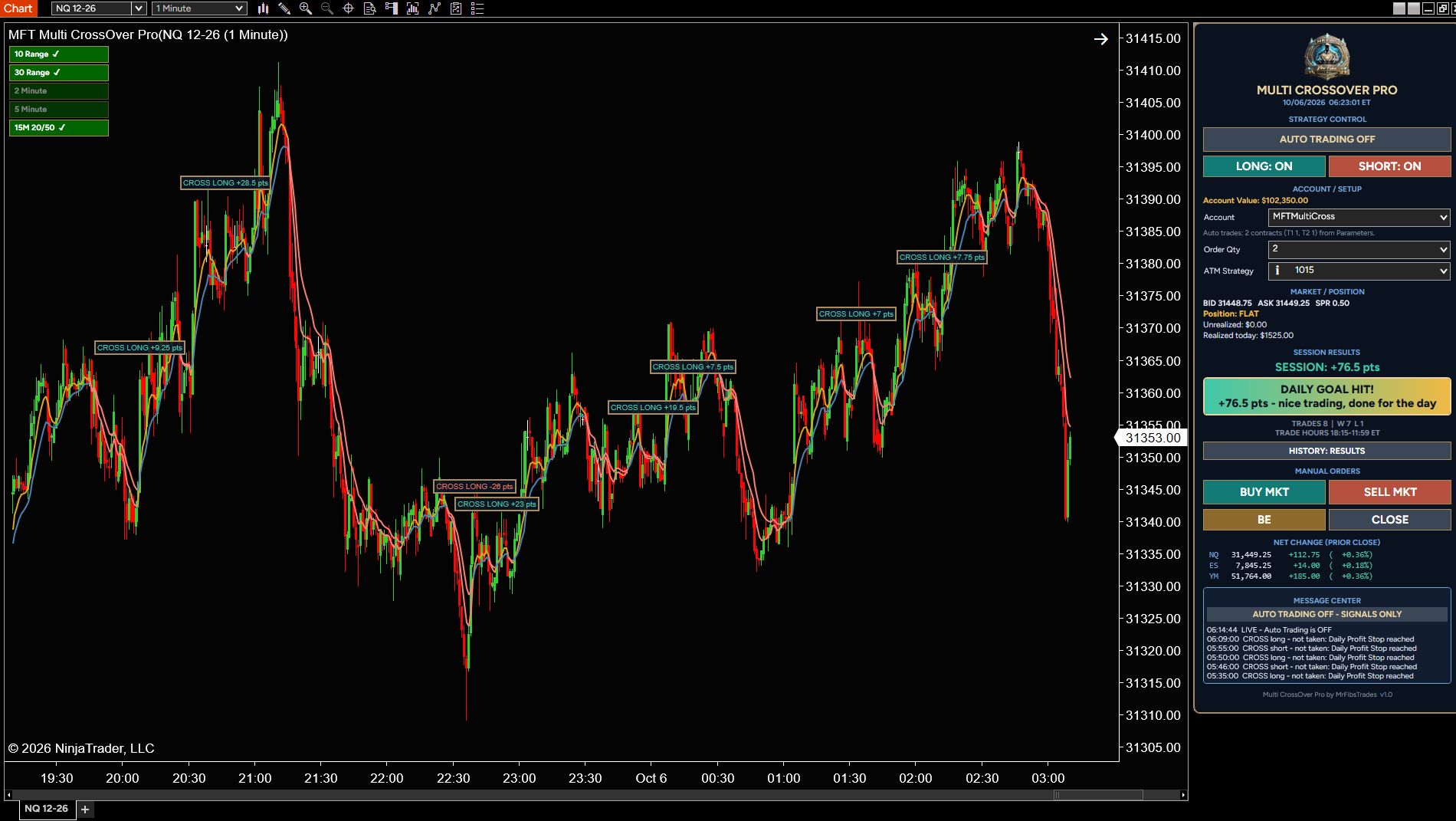
MFT Multi CrossOver Pro trades the classic fast / slow EMA crossover - but only when the bigger picture agrees. Every cross is checked against four trend series and the 15-minute EMA 20 / 50 before it is taken, so you trade with the trend instead of against it.

Use it as a signal and drawing tool, or turn on Auto Trading and let it send the entry, stop and targets straight to your account from its own panel - no separate strategy needed.

How It Works

  • A long is the fast EMA crossing above the slow EMA on a closed bar; a short is a cross below (4 / 9 EMA by default)
  • The cross is only taken when every trend filter you have on points the same way
  • Four trend series - 10 Range, 30 Range, 2 Minute and 5 Minute by default, each with its own fast / slow EMA
  • 15-minute EMA 20 / 50 filter - longs only above, shorts only below
  • Trend boxes on the chart show each filter green, red or loading - click a box to turn that filter on or off
  • 15M FLIP line shows the price where the 15-minute trend would change
  • Signals only on closed bars - never in the middle of a bar

Stops and Targets

  • Stop from the chart's ATR or a fixed number of points
  • Up to 5 targets, each with its own contracts - or leave one as a runner
  • Targets from ATR steps, points, or a multiple of your risk
  • Stop moves to break-even (or your setting) after Target 1
  • Optional trailing stop by ATR or points - it only ever tightens
  • Drag a stop or target on the chart and the indicator follows it

The Control Panel

  • Sits on Chart Trader - Auto Trading ON / OFF, LONG and SHORT switches
  • Pick your account, see live bid / ask, position and P&L
  • BUY MKT and SELL MKT with your ATM, plus BE and CLOSE
  • Net change for NQ, ES and YM against the prior close
  • MFT badge - click for today's economic events and this week's red-folder news
  • Message Center explains every signal, skip, fill and stop move

Built-In Discipline

  • Trade hours with up to three windows (Eastern Time)
  • Daily Profit Stop, Daily Loss Stop and Maximum Trades Per Day
  • One trade at a time and a Maximum Contracts cap
  • Auto Trading is always OFF when the indicator loads

Trade Center

  • Keeps the record of every live trade for the last 10 sessions
  • Points, wins and losses for the day, with a scoreboard between your loss and profit stops
  • Step back through each day, plus a last-10-days chart

Clear Trade Drawings

  • Entry, stop and target lines with points
  • Optional risk / reward boxes
  • Result label on every finished trade
  • History modes: Full, Last Trade, Results or Off

What's Included

  • Full PDF user manual - every feature and setting explained
  • 30-minute one-on-one setup session with MrFibs - we get it installed, set up and running on your charts together

Built for NQ, ES, YM and other futures on NinjaTrader 8. All times in Eastern Time.

Trading futures involves substantial risk of loss. Always test on a Sim account first. You are responsible for every order placed on your account.

Getting started

  1. Buy it here and enter your NinjaTrader Machine ID (Help › About).
  2. Download the .zip from your account, then in NinjaTrader 8: Tools › Import › NinjaScript Add-On.
  3. Restart NinjaTrader and add it to a chart. The manual (PDF) is in your account.
  4. Run it in Sim or Playback until you’re comfortable with how it performs.

Questions

What chart types does it work on?

It works on regular time charts and Heikin Ashi charts. It does not work on Renko bars.

What markets can I use it on?

It is built for NQ, ES and YM, and works on other futures in NinjaTrader 8. All times are in Eastern Time, whatever your PC or chart time zone.

Does it place trades for me?

Only if you want it to. With Auto Trading OFF it draws and explains every signal. Turn Auto Trading ON and it sends the entry, stop and targets to the account you pick on its panel. Auto Trading is always OFF when the indicator loads.

Does it use my ATM strategy for auto trades?

No. Auto trades use the stop, targets and contracts from the indicator's settings. The ATM Strategy on the panel is only for the BUY MKT and SELL MKT buttons.

A cross happened but no trade was taken. Why?

Check the Message Center on the panel. It tells you which trend filter disagreed, or if the cross was outside your trade hours, past a daily limit, or a trade was already open.

What do the trend boxes mean?

Each box is one trend filter - green is up, red is down, gray is still loading. Click a box to turn that filter on or off.

Can I set daily limits?

Yes. Set a Daily Profit Stop, a Daily Loss Stop and Maximum Trades Per Day. Once one is reached, no new trades are taken that day.

What happens if I remove the indicator with a trade open?

The stop and target orders already on your account stay working. Manage or close the position from Chart Trader.

Should I test it first?

Yes. Always run it on a Sim account (or in Playback) until you know exactly how it behaves with your settings.

What do I get with my purchase?

The indicator, a full PDF user manual, and a 30-minute one-on-one setup session with MrFibs to get it installed and running on your charts.

Reviews

No reviews yet. Own it? Leave the first review from your account page.

You might also like

MrFibsTrades Market Pulse - Net Change

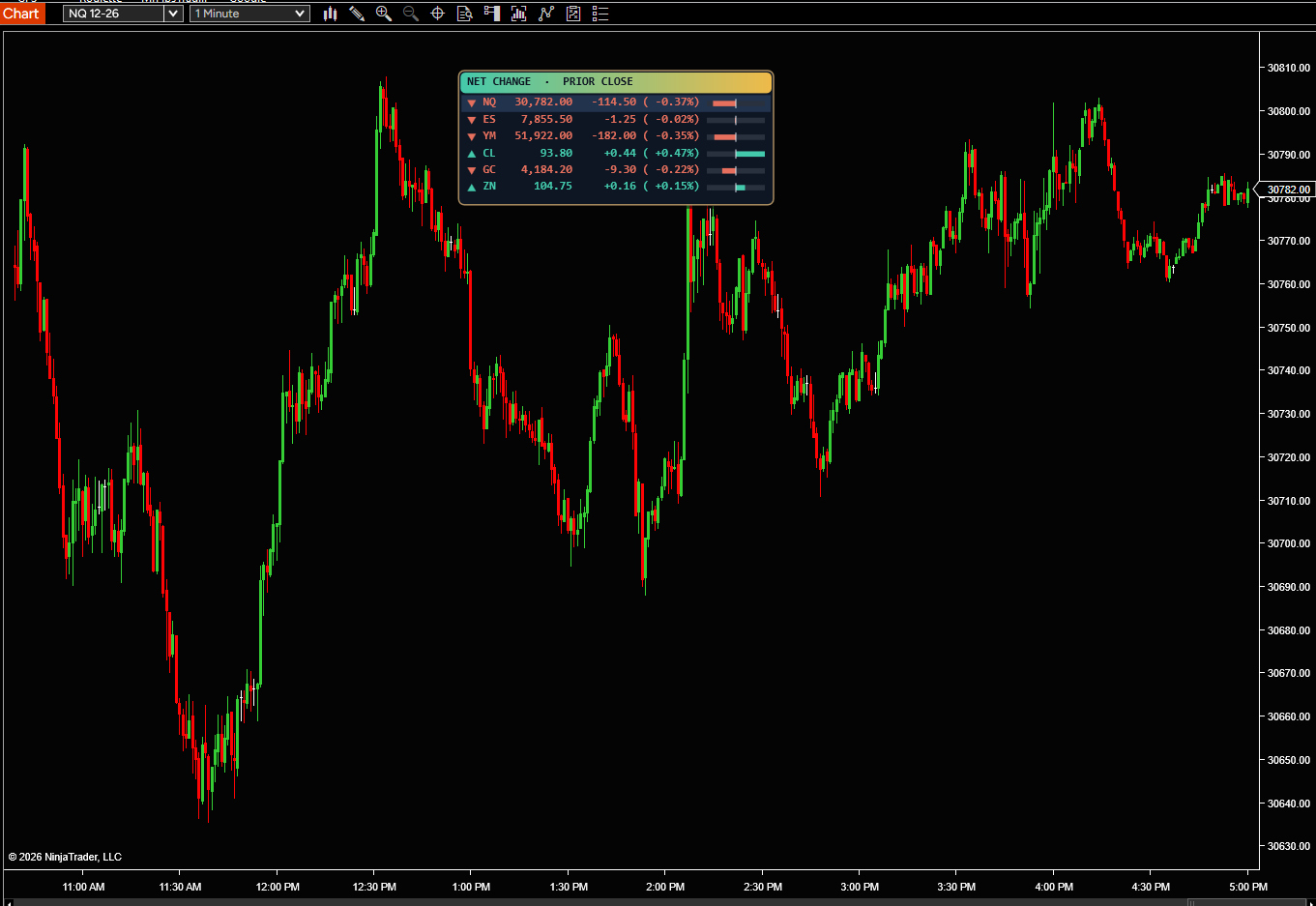
See how NQ, ES, YM and up to 8 markets are doing today, right on your chart. Each one shows its price and how far it has moved from yesterday’s 4:00 PM close, in points and percent.

MFT Pivot Levels

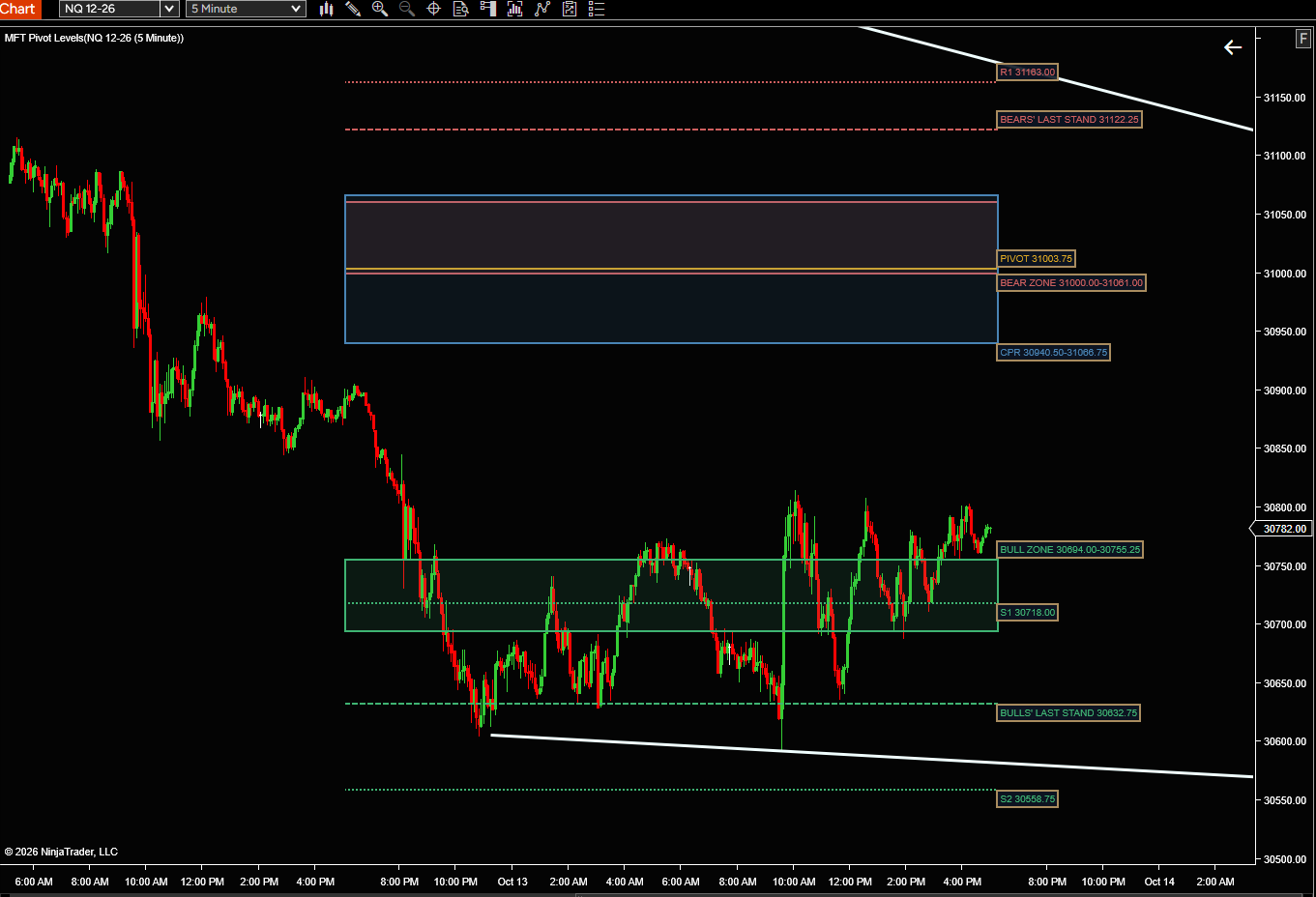
The same levels MFT Pivot Player Pro trades, drawn on your chart for free. The prior day’s Bear and Bull Zones, Last Stands, pivot and central pivot range show where price is likely to react today.
← All indicators

Free download

Free indicator

NinjaTrader 8 indicator · free · saved in your account

We'll also email you the install steps. See our Privacy Policy.

Secure checkout

Checkout

Licenses

Where do I find my Machine ID?

In NinjaTrader 8 go to Help > About and copy the Machine ID. You can download and install the indicator right after checkout; we’ll email you when your license is confirmed. Don’t have NinjaTrader yet? Get it free.

or